Stop losing jobs to a contact form nobody checks.
Fielder automatically turns your website visitors into qualified, booked appointments. One link, no new software to learn, works alongside the tools you already use.
- Free for your first month
- No credit card required
- Set up in minutes
You're not losing customers. You're losing them at the contact form.
A dumb form
Most website forms just email you a name and a maybe-real phone number. No context on the job, no urgency, no way to tell a serious lead from someone browsing. You find out everything on the phone, if they even pick up when you call back.
Missed after-hours calls
A customer with a busted AC at 9pm won't wait until morning. If nobody's there to answer, they're already on Google searching for the next company. By the time you see the missed call, the job is gone.
Half-filled forms, fully lost
Someone starts typing their name and number, gets distracted, closes the tab. A normal contact form loses that person completely. You never even know they existed, let alone that they wanted work done.
Software you don't have time to learn
Platforms built to do everything (funnels, campaigns, pipelines, workflow builders) end up doing nothing well. $300+/month and a multi-week setup, before you've booked a single job from it.
How it works
Get your link
Sign up and you get a hosted booking link built for your business: your name, your branding, your services. Takes a couple of minutes, no credit card to start.
Put it anywhere
Paste it on your website, your Google Business profile, your Instagram bio, a QR code on the truck. It works with the site you already have. Nothing to rebuild.
Visitors get qualified
A smart assistant asks the right questions for your trade (different follow-ups for a repair than a new install), then books straight into your real calendar.
You get notified
Every lead lands in your dashboard, even the ones who don't finish, with the urgent ones flagged and reminders sent automatically before the appointment.
Built for one job
No funnels, no campaign builder, no workflow automation to configure. Just the pieces that turn a visitor into a booked estimate.
Smart qualifying assistant
Asks the right questions for your trade instead of a blank text box.
Captures leads who don't finish
Half-filled contact info still becomes a callable lead, not a lost one.
Real booking calendar
Tied to your actual business hours. No double-booking.
Instant notifications
You (and the customer) hear about it the moment a lead comes in or books.
Automatic reminders
Cuts down no-shows without you lifting a finger.
“Needs response now” alerts
Leads sitting untouched get flagged, so nothing slips through.
Lead scoring
Hot, Qualified, or Needs Review, so you know who to call first.
Track why you lose deals
See patterns in lost leads, not just a number.
One link, no rebuild
Works with the website you already have.
Your dashboard, not a spreadsheet
This is the actual product, not a mockup. Every lead scored and tracked, with the ones that need you flagged first.
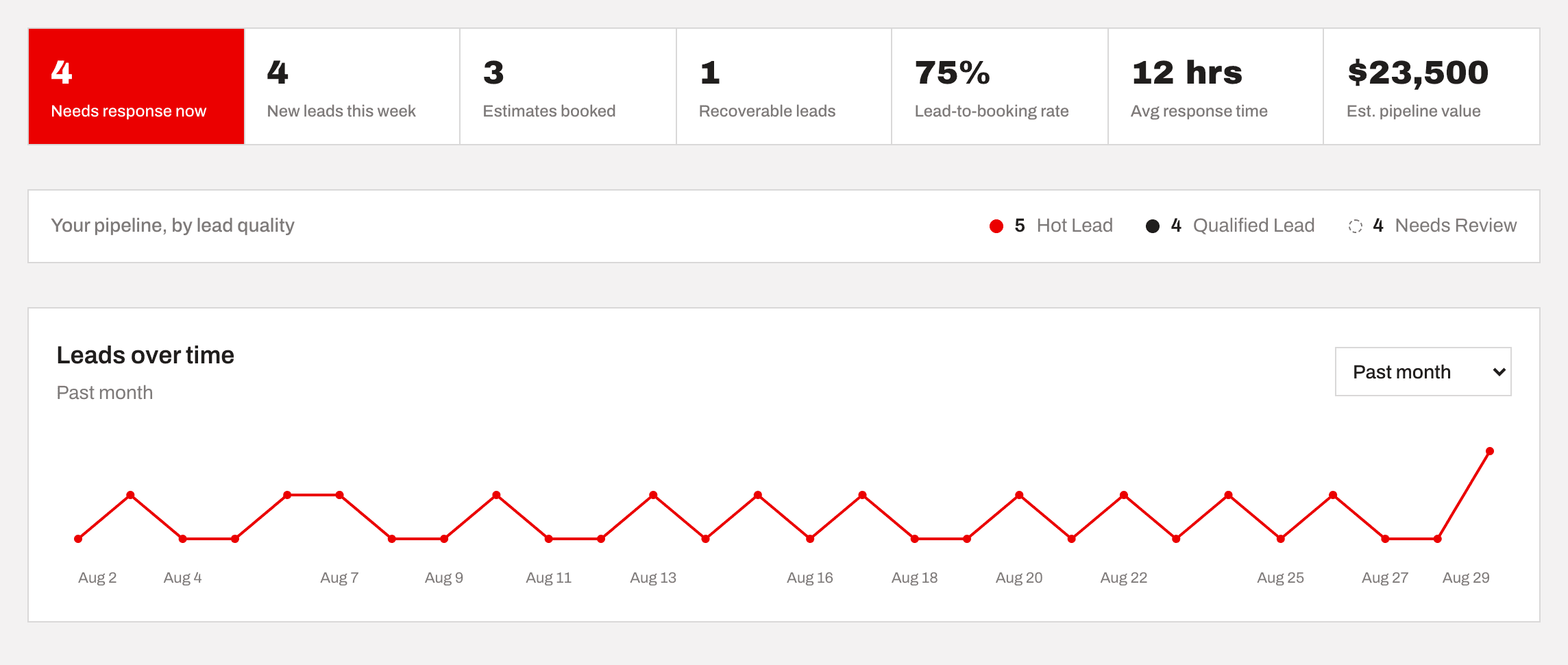
Nothing sits untouched
Leads left unanswered for hours get flagged red before they go cold.
Every lead, already scored
Hot, Qualified, or Needs Review, scored the moment it comes in.
A real trend, not a guess
Switchable range, hover any point for the exact count.
Recoverable leads, not lost ones
Gave you their info but didn't book? Still counts, still callable.
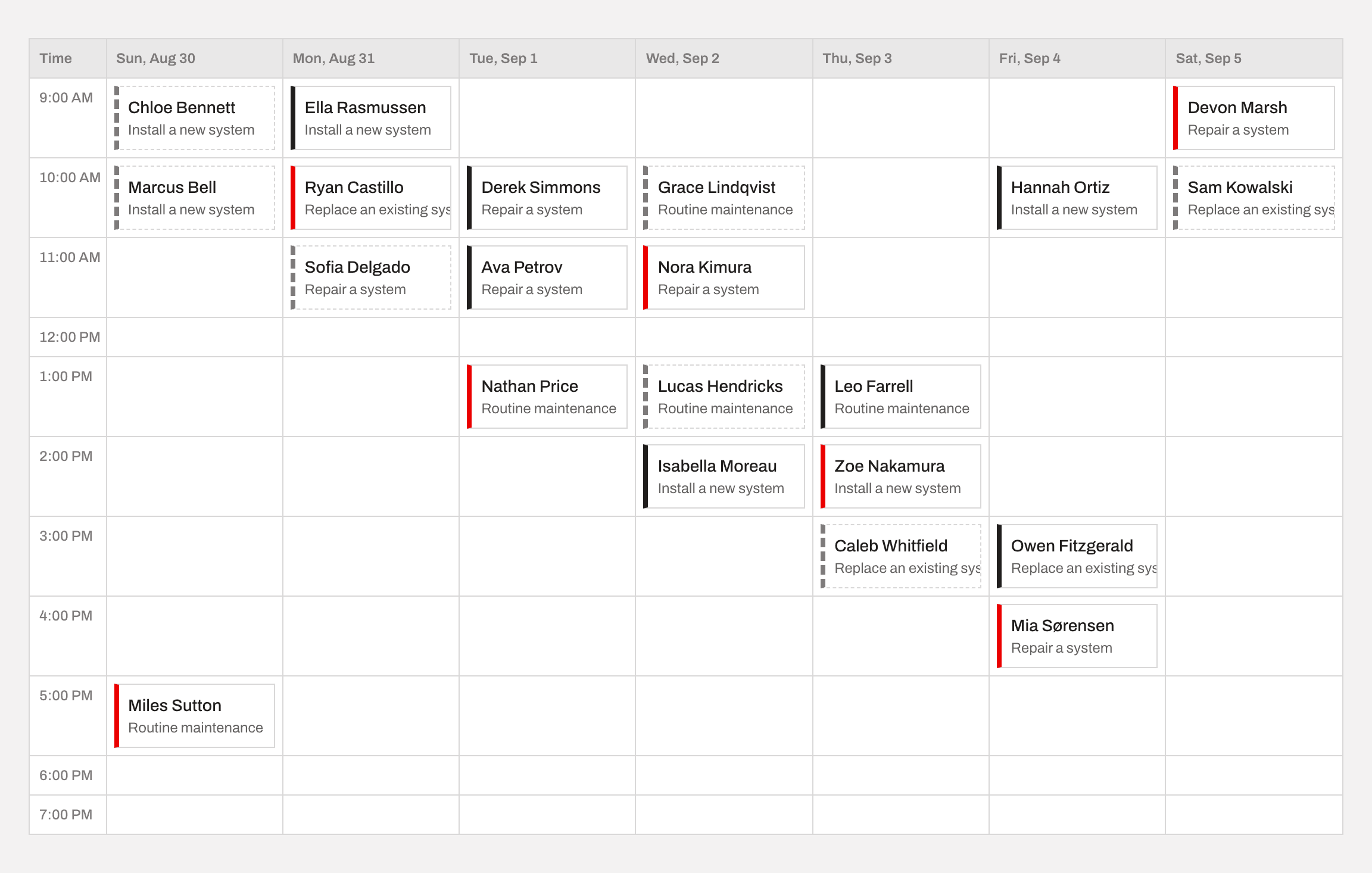
Your real calendar, not a guess
The full week, tied to your actual business hours. Every booking shows up here the second a visitor confirms a time, color-coded by lead quality so you know who to prioritize at a glance.
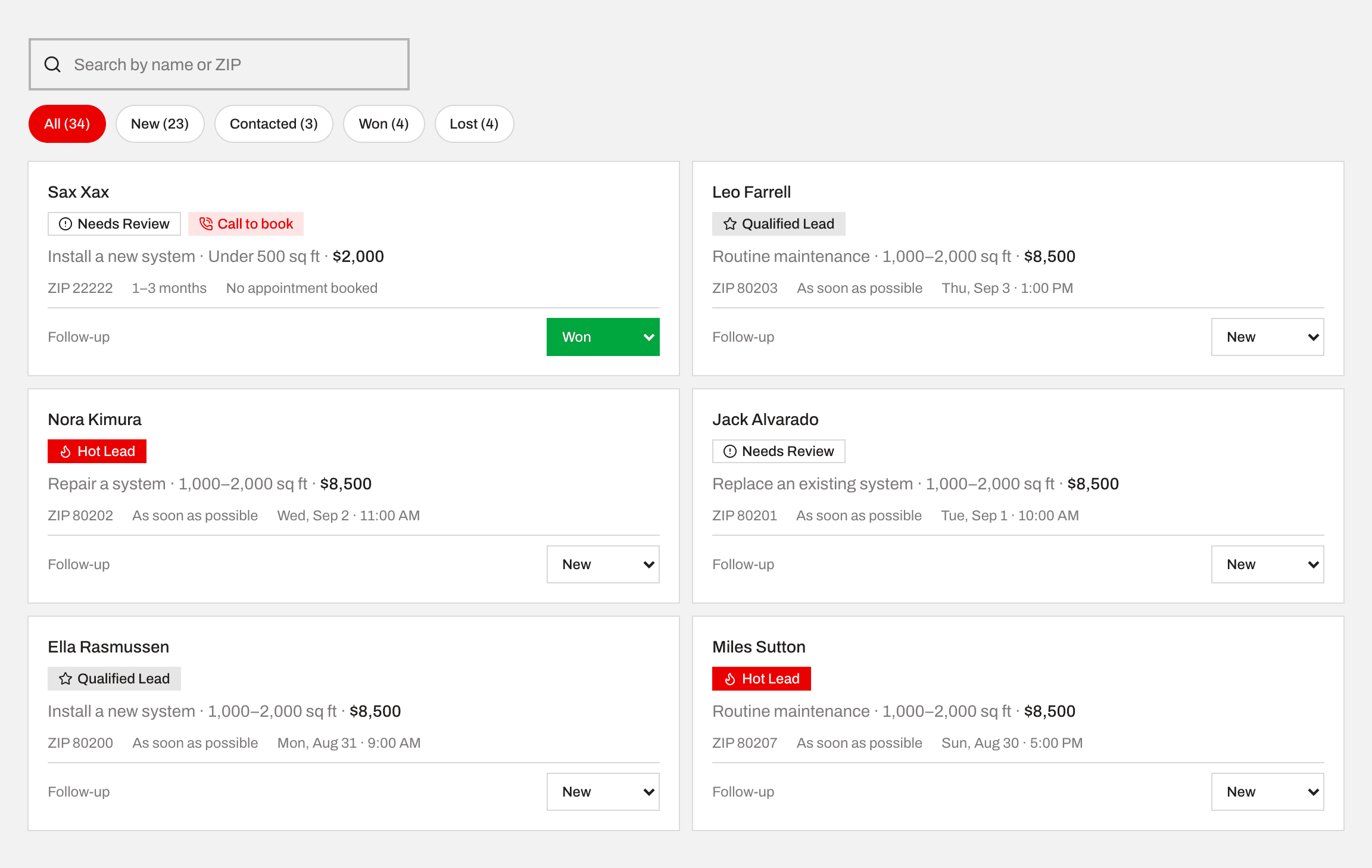
Every lead in one place
Search by name or ZIP, filter by follow-up status, and see the qualification badge and estimated value on every card without opening a single one.
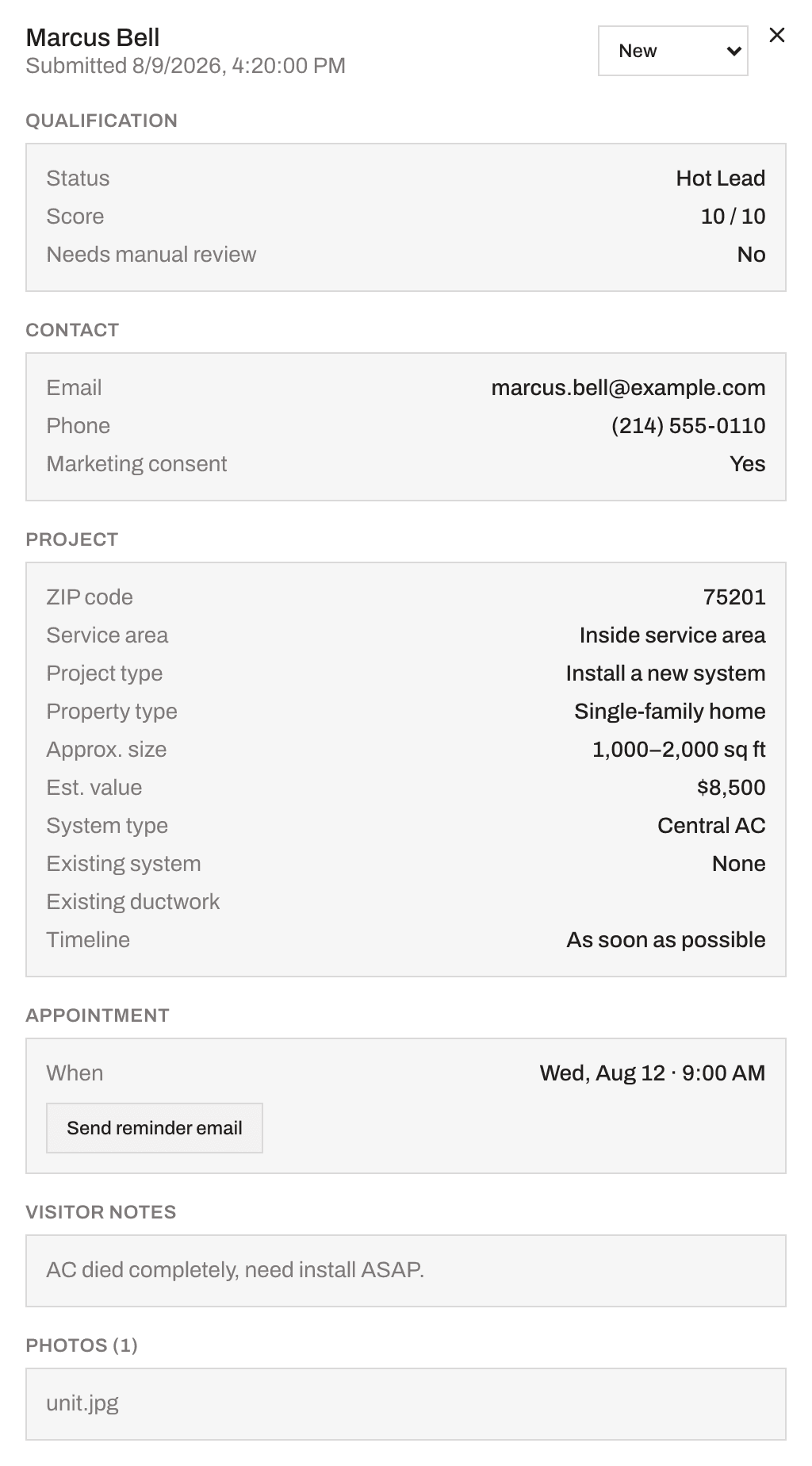
Click into any lead, see everything
No digging through email threads or a shared spreadsheet. Every detail a visitor gave the assistant is right here, organized, the moment you open a lead.
- Full qualification breakdown: status, score out of 10, whether it needs manual review
- Every answer from the qualifying conversation, laid out by category (contact, project, appointment)
- One-click reminder emails, sent to both the visitor and you
- Any photos the visitor uploaded, attached right to the lead
- Their own notes on the job, typed in their own words
What your visitors actually see
Branded to your business, not to Fielder. A visitor never knows it's a third-party tool. They just see your name, answer a few questions, and book.
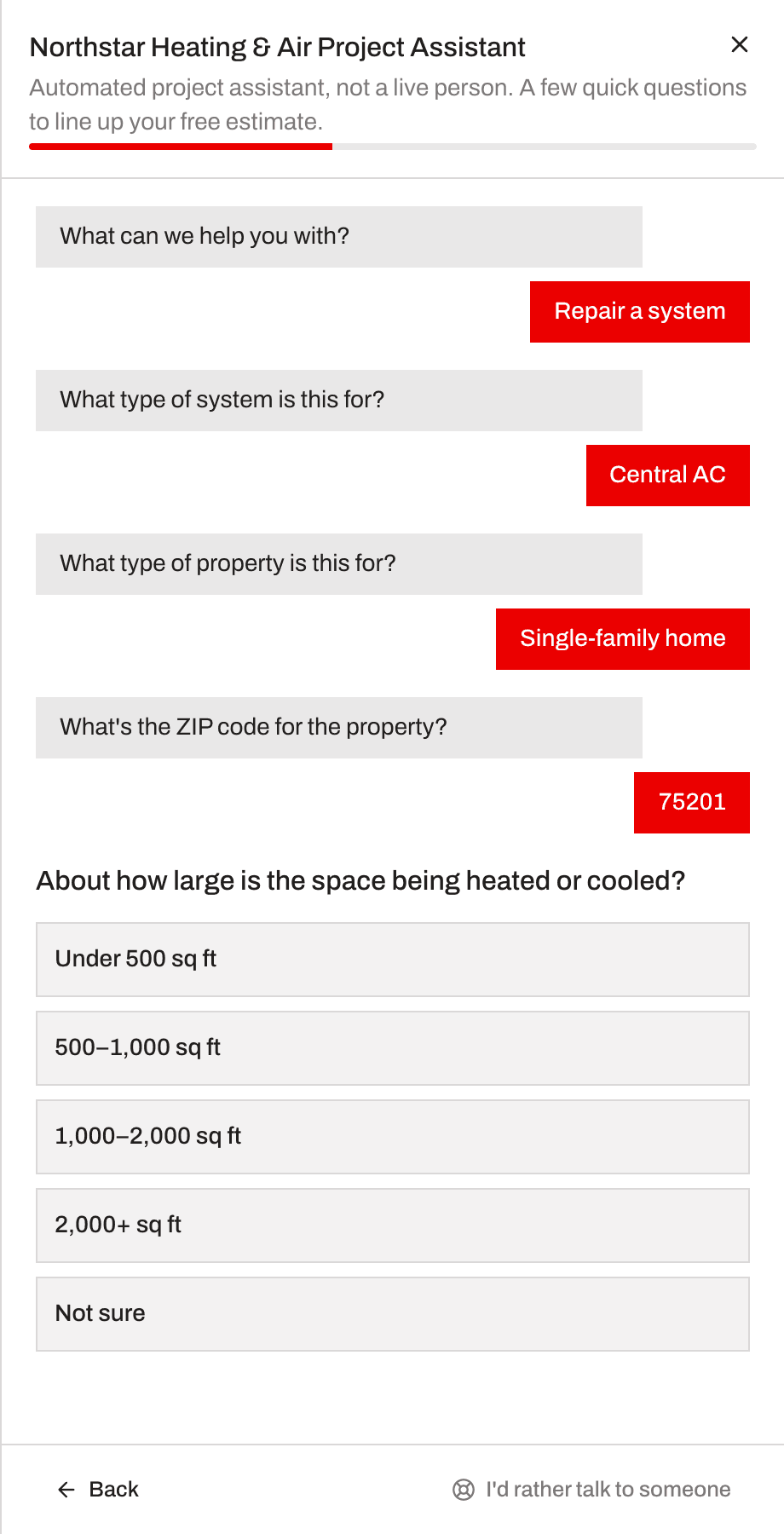
The conversation adapts to what they answer.
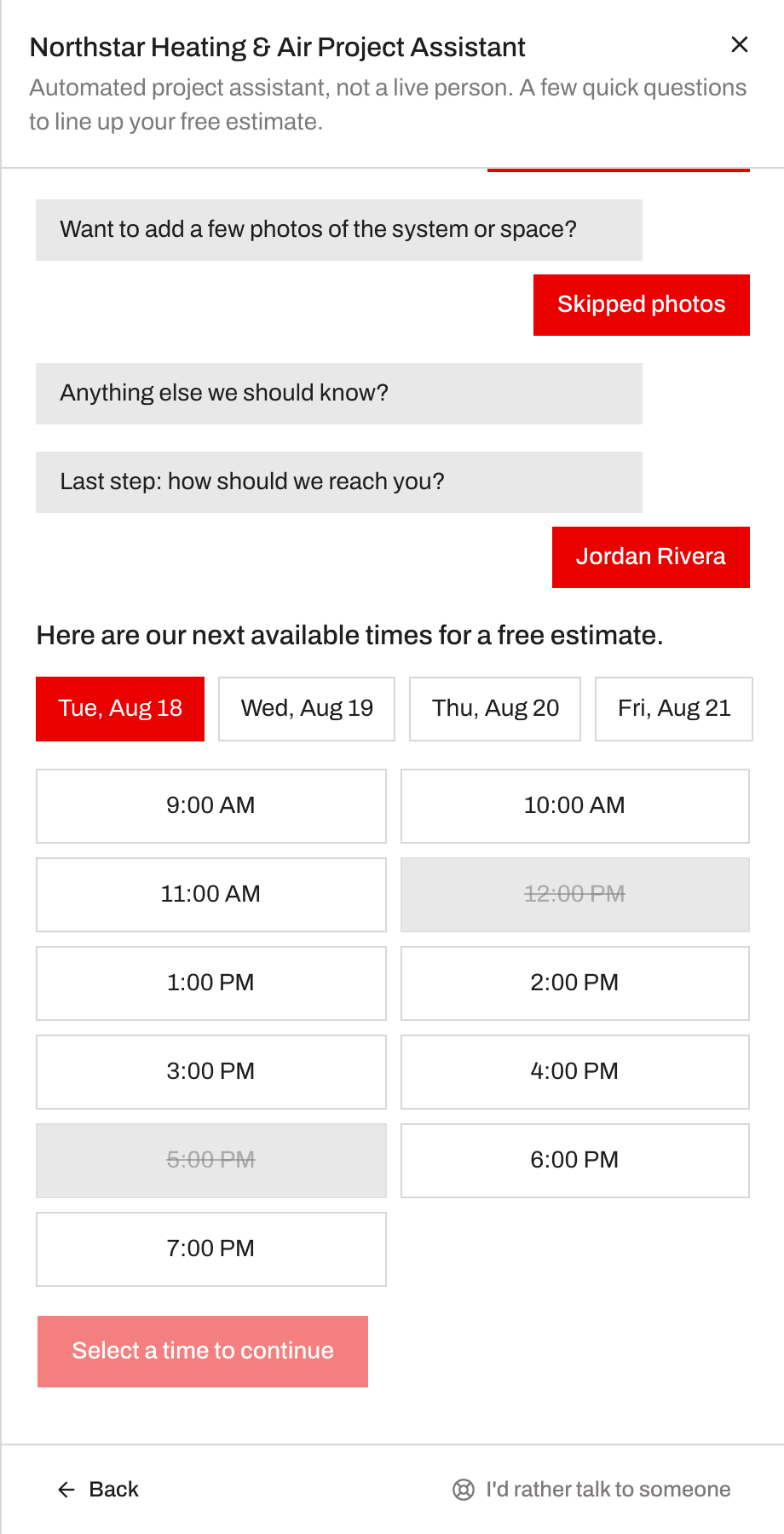
Real open slots tied to your actual calendar.
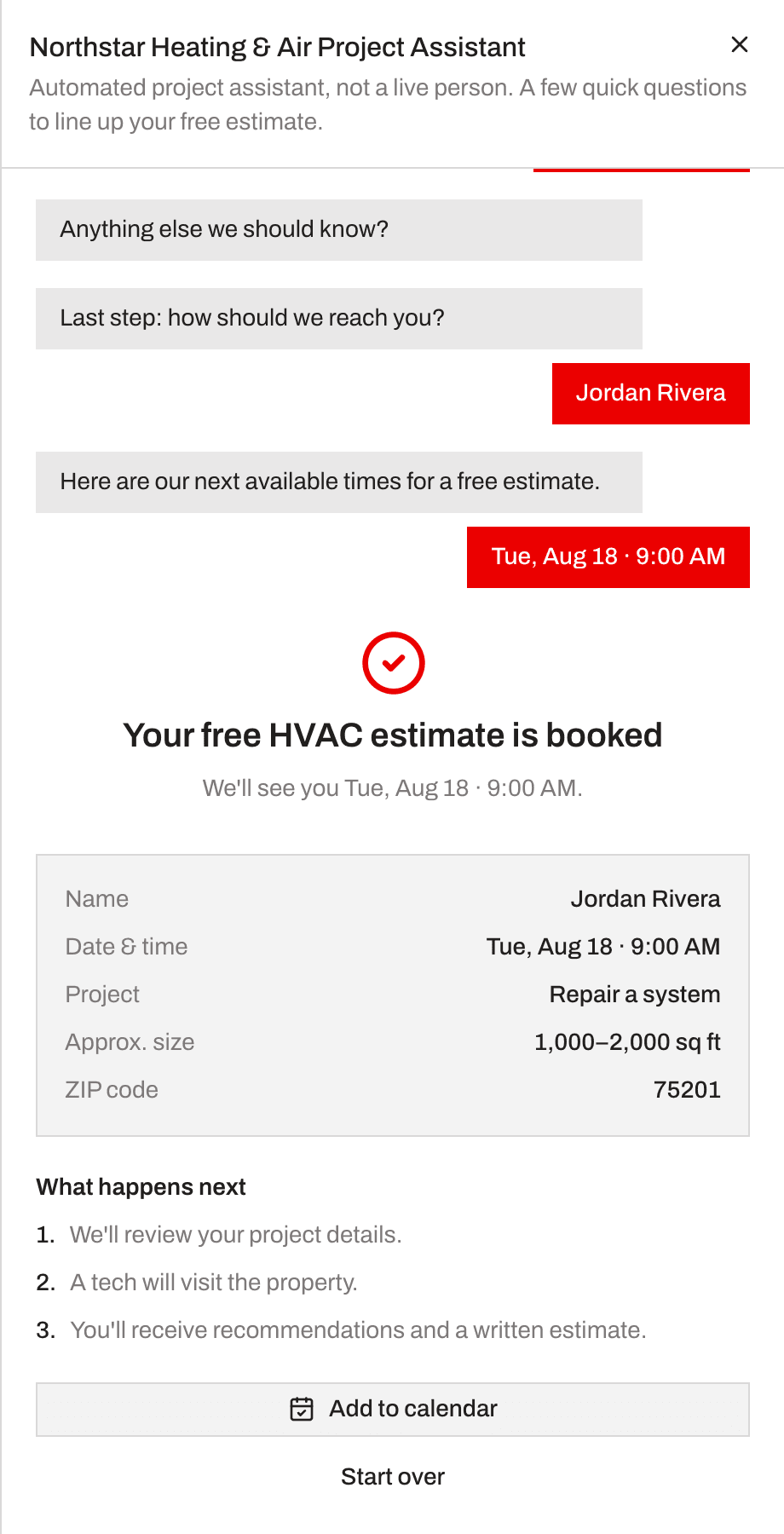
An instant confirmation, no back-and-forth emails.
Try it free for a month
No credit card to start. No setup fees, no contracts, ever.
Free
for your first month
Then $99/month, cancel anytime
- Your own hosted booking link
- Smart qualifying assistant for your trade
- Unlimited leads, including unfinished ones
- Booking calendar tied to your hours
- Instant notifications + automatic reminders
- Lead scoring and follow-up tracking
No credit card required
Questions you'd probably ask
Quick answers before you sign up.
Do I need to rebuild my website?
No. You get a hosted booking link (yourbusiness.gofielder.com/b/yourname) that you paste anywhere: a button on your existing site, your Google Business profile, your Instagram bio, a QR code on the truck. Nothing to migrate or redesign.
What if a visitor starts the form but doesn't finish?
They're still captured as a lead the moment they give their name and contact info, even if they never book a time. You'll see them in your dashboard as unfinished and can follow up directly.
Can a customer change their appointment time after booking?
Yes. Every booking confirmation includes a reschedule link that lets the visitor pick a new open slot themselves, no call back to your business needed.
Does this replace my CRM or other tools?
No. Fielder captures, qualifies, and books leads, then hands you a clean feed you can act on however you already do, by phone, text, or your existing CRM. It's not trying to replace what already works for you.
What happens to my leads' data?
It's collected on behalf of your business and only shown in your dashboard. It's never sold and never shared with any other business. Full details are in the Privacy Policy.
I run more than one business, or multiple locations. Can I use one account?
Each account is set up for one business. If you need to represent more than one, contact us and we'll get you set up properly rather than have you work around it.
Ready to stop losing leads?
Your first month is free. Set up your booking link in a few minutes, no credit card required.
Start your free month